I Am King Of India

Go to Blogger edit html and find these sentences.Now replace these sentences with your own descriptions.This theme is Bloggerized by Lasantha Bandara - Premiumbloggertemplates.com.

Never Stop Me Now In This World

Go to Blogger edit html and find these sentences.Now replace these sentences with your own descriptions.This theme is Bloggerized by Lasantha Bandara - Premiumbloggertemplates.com.

Programming Master Mind Coder

Go to Blogger edit html and find these sentences.Now replace these sentences with your own descriptions.This theme is Bloggerized by Lasantha Bandara - Premiumbloggertemplates.com.

This is default featured slide 4 title

Go to Blogger edit html and find these sentences.Now replace these sentences with your own descriptions.This theme is Bloggerized by Lasantha Bandara - Premiumbloggertemplates.com.

This is default featured slide 5 title

Go to Blogger edit html and find these sentences.Now replace these sentences with your own descriptions.This theme is Bloggerized by Lasantha Bandara - Premiumbloggertemplates.com.

Pages

Master Coder

Hacking News , Cyber Crime , Ethical Hacking , CCNA, Seo , Google Adsense , Web Development ,

Cybercrime spreads on Facebook

BOSTON (Reuters) - Cybercrime is rapidly spreading on Facebook as fraudsters prey on users who think the world's top social networking site is a safe haven on the Internet.

Lisa Severens, a clinical trials manager from Worcester, Massachusetts, learned the hard way. A virus took control of her laptop and started sending pornographic photos to colleagues.

"I was mortified about having to deal with it at work," said Severens, whose employer had to replace her computer because the malicious software could not be removed.

Cybercrime, which costs U.S. companies and individuals billions of dollars a year, is spreading fast on Facebook because such scams target and exploit those naive to the dark side of social networking, security experts say.

While News Corp's (NWSA.O) MySpace was the most-popular hangout for cyber criminals two years ago, experts say hackers are now entrenched on Facebook, whose membership has soared from 120 million in December to more than 200 million today.

"Facebook is the social network du jour. Attackers go where the people go. Always," said Mary Landesman, a senior researcher at Web security company ScanSafe.

Scammers break into accounts posing as friends of users, sending spam that directs them to websites that steal personal information and spread viruses. Hackers tend to take control of infected PCs for identity theft, spamming and other mischief.

Facebook manages security from its central headquarters in Palo Alto, California, screening out much of the spam and malicious software targeting its users. That should make it a safer place to surf than the broader Internet, but criminals are relentless and some break through Facebook's considerable filter.

The rise in attacks reflect Facebook's massive growth. Company spokesman Simon Axten said that as the number of users has increased, the percentage of successful attacks has stayed about the same, remaining at less than 1 percent of members over the past five years.

By comparison, he said, FBI data shows that about 3 percent of U.S. households were burglarized in 2005.

"Security is an arms race, and we're always updating these systems and building new ones to respond to new and evolving threats," Axten said.

When criminal activity is detected on one account, the site quickly looks for similar patterns in others and either deletes bad emails or resets passwords to compromised accounts, he said. Facebook is hiring a fraud investigator and a fraud analyst, according to the careers section of its website.

CANNOT GUARANTEE WEB SAFETY

But ultimately Facebook says its members are responsible for their own security.

"We do our best to keep Facebook safe, but we cannot guarantee it," Facebook says in a warning in a section of the site on the terms and conditions of use, which members may not bother to read. (www.facebook.com/terms.php)

"People implicitly trust social networking sites because they don't understand the real threats and dangers. It's like walking down the street and trusting everybody you meet," said Randy Abrams, a researcher with security software maker ESET.

Amy Benoit, a human resources manager in Oceanside, California, said she may stop using Facebook altogether after she became entangled in a popular scam: A fraudster sent instant messages to a friend saying that Benoit had been attacked in London and needed $600 to get home.

Yale University last week warned its business school students to be careful when using Facebook after several of them turned in infected laptops.

One of the most insidious threats is Koobface, a virus that takes over PCs when users click on links in spam messages. The virus turned up on MySpace about a year ago, but its unknown authors now focus on spreading it through Facebook, which is struggling to wipe it out.

"Machines that are compromised are at the whim of the attacker," said McAfee Inc (MFE.N) researcher Craig Schmugar.

McAfee, the world's No. 2 security software maker, says Koobface variants almost quadrupled last month to 4,000. "Because Facebook is a closed system, we have a tremendous advantage over e-mail. Once we detect a spam message, we can delete that message in all inboxes across the site," said Schmugar.

Facebook's Axten said the site does not know how many users have been infected by Koobface.

A new website that follows Facebook news, www.fbhive.com, recently identified a vulnerability that made it possible to access any user's private information using a simple hack. The loophole has since been closed.

"We don't have any evidence to suggest that it was ever exploited for malicious purposes," Axten said.

Hackers even find ways to get into accounts of savvy users like Sandeep Junnarkar, a journalism professor at City University of New York and former tech reporter. Last month he learned his account was hacked as he waited for a flight for Paris. He quickly changed his password before boarding.

"Am I surprised that it happened? Not really," he said.

Cybercrime spreads on Facebook

BOSTON (Reuters) - Cybercrime is rapidly spreading on Facebook as fraudsters prey on users who think the world's top social networking site is a safe haven on the Internet.

Lisa Severens, a clinical trials manager from Worcester, Massachusetts, learned the hard way. A virus took control of her laptop and started sending pornographic photos to colleagues.

"I was mortified about having to deal with it at work," said Severens, whose employer had to replace her computer because the malicious software could not be removed.

Cybercrime, which costs U.S. companies and individuals billions of dollars a year, is spreading fast on Facebook because such scams target and exploit those naive to the dark side of social networking, security experts say.

While News Corp's (NWSA.O) MySpace was the most-popular hangout for cyber criminals two years ago, experts say hackers are now entrenched on Facebook, whose membership has soared from 120 million in December to more than 200 million today.

"Facebook is the social network du jour. Attackers go where the people go. Always," said Mary Landesman, a senior researcher at Web security company ScanSafe.

Scammers break into accounts posing as friends of users, sending spam that directs them to websites that steal personal information and spread viruses. Hackers tend to take control of infected PCs for identity theft, spamming and other mischief.

Facebook manages security from its central headquarters in Palo Alto, California, screening out much of the spam and malicious software targeting its users. That should make it a safer place to surf than the broader Internet, but criminals are relentless and some break through Facebook's considerable filter.

The rise in attacks reflect Facebook's massive growth. Company spokesman Simon Axten said that as the number of users has increased, the percentage of successful attacks has stayed about the same, remaining at less than 1 percent of members over the past five years.

By comparison, he said, FBI data shows that about 3 percent of U.S. households were burglarized in 2005.

"Security is an arms race, and we're always updating these systems and building new ones to respond to new and evolving threats," Axten said.

When criminal activity is detected on one account, the site quickly looks for similar patterns in others and either deletes bad emails or resets passwords to compromised accounts, he said. Facebook is hiring a fraud investigator and a fraud analyst, according to the careers section of its website.

CANNOT GUARANTEE WEB SAFETY

But ultimately Facebook says its members are responsible for their own security.

"We do our best to keep Facebook safe, but we cannot guarantee it," Facebook says in a warning in a section of the site on the terms and conditions of use, which members may not bother to read. (www.facebook.com/terms.php)

"People implicitly trust social networking sites because they don't understand the real threats and dangers. It's like walking down the street and trusting everybody you meet," said Randy Abrams, a researcher with security software maker ESET.

Amy Benoit, a human resources manager in Oceanside, California, said she may stop using Facebook altogether after she became entangled in a popular scam: A fraudster sent instant messages to a friend saying that Benoit had been attacked in London and needed $600 to get home.

Yale University last week warned its business school students to be careful when using Facebook after several of them turned in infected laptops.

One of the most insidious threats is Koobface, a virus that takes over PCs when users click on links in spam messages. The virus turned up on MySpace about a year ago, but its unknown authors now focus on spreading it through Facebook, which is struggling to wipe it out.

"Machines that are compromised are at the whim of the attacker," said McAfee Inc (MFE.N) researcher Craig Schmugar.

McAfee, the world's No. 2 security software maker, says Koobface variants almost quadrupled last month to 4,000. "Because Facebook is a closed system, we have a tremendous advantage over e-mail. Once we detect a spam message, we can delete that message in all inboxes across the site," said Schmugar.

Facebook's Axten said the site does not know how many users have been infected by Koobface.

A new website that follows Facebook news, www.fbhive.com, recently identified a vulnerability that made it possible to access any user's private information using a simple hack. The loophole has since been closed.

"We don't have any evidence to suggest that it was ever exploited for malicious purposes," Axten said.

Hackers even find ways to get into accounts of savvy users like Sandeep Junnarkar, a journalism professor at City University of New York and former tech reporter. Last month he learned his account was hacked as he waited for a flight for Paris. He quickly changed his password before boarding.

"Am I surprised that it happened? Not really," he said.

Cybercrime spreads on Facebook

BOSTON (Reuters) - Cybercrime is rapidly spreading on Facebook as fraudsters prey on users who think the world's top social networking site is a safe haven on the Internet.

Lisa Severens, a clinical trials manager from Worcester, Massachusetts, learned the hard way. A virus took control of her laptop and started sending pornographic photos to colleagues.

"I was mortified about having to deal with it at work," said Severens, whose employer had to replace her computer because the malicious software could not be removed.

Cybercrime, which costs U.S. companies and individuals billions of dollars a year, is spreading fast on Facebook because such scams target and exploit those naive to the dark side of social networking, security experts say.

While News Corp's (NWSA.O) MySpace was the most-popular hangout for cyber criminals two years ago, experts say hackers are now entrenched on Facebook, whose membership has soared from 120 million in December to more than 200 million today.

"Facebook is the social network du jour. Attackers go where the people go. Always," said Mary Landesman, a senior researcher at Web security company ScanSafe.

Scammers break into accounts posing as friends of users, sending spam that directs them to websites that steal personal information and spread viruses. Hackers tend to take control of infected PCs for identity theft, spamming and other mischief.

Facebook manages security from its central headquarters in Palo Alto, California, screening out much of the spam and malicious software targeting its users. That should make it a safer place to surf than the broader Internet, but criminals are relentless and some break through Facebook's considerable filter.

The rise in attacks reflect Facebook's massive growth. Company spokesman Simon Axten said that as the number of users has increased, the percentage of successful attacks has stayed about the same, remaining at less than 1 percent of members over the past five years.

By comparison, he said, FBI data shows that about 3 percent of U.S. households were burglarized in 2005.

"Security is an arms race, and we're always updating these systems and building new ones to respond to new and evolving threats," Axten said.

When criminal activity is detected on one account, the site quickly looks for similar patterns in others and either deletes bad emails or resets passwords to compromised accounts, he said. Facebook is hiring a fraud investigator and a fraud analyst, according to the careers section of its website.

CANNOT GUARANTEE WEB SAFETY

But ultimately Facebook says its members are responsible for their own security.

"We do our best to keep Facebook safe, but we cannot guarantee it," Facebook says in a warning in a section of the site on the terms and conditions of use, which members may not bother to read. (www.facebook.com/terms.php)

"People implicitly trust social networking sites because they don't understand the real threats and dangers. It's like walking down the street and trusting everybody you meet," said Randy Abrams, a researcher with security software maker ESET.

Amy Benoit, a human resources manager in Oceanside, California, said she may stop using Facebook altogether after she became entangled in a popular scam: A fraudster sent instant messages to a friend saying that Benoit had been attacked in London and needed $600 to get home.

Yale University last week warned its business school students to be careful when using Facebook after several of them turned in infected laptops.

One of the most insidious threats is Koobface, a virus that takes over PCs when users click on links in spam messages. The virus turned up on MySpace about a year ago, but its unknown authors now focus on spreading it through Facebook, which is struggling to wipe it out.

"Machines that are compromised are at the whim of the attacker," said McAfee Inc (MFE.N) researcher Craig Schmugar.

McAfee, the world's No. 2 security software maker, says Koobface variants almost quadrupled last month to 4,000. "Because Facebook is a closed system, we have a tremendous advantage over e-mail. Once we detect a spam message, we can delete that message in all inboxes across the site," said Schmugar.

Facebook's Axten said the site does not know how many users have been infected by Koobface.

A new website that follows Facebook news, www.fbhive.com, recently identified a vulnerability that made it possible to access any user's private information using a simple hack. The loophole has since been closed.

"We don't have any evidence to suggest that it was ever exploited for malicious purposes," Axten said.

Hackers even find ways to get into accounts of savvy users like Sandeep Junnarkar, a journalism professor at City University of New York and former tech reporter. Last month he learned his account was hacked as he waited for a flight for Paris. He quickly changed his password before boarding.

"Am I surprised that it happened? Not really," he said.

Free Downloads Windows 8 oringinal 2012

Free Downloads Windows 8 oringinal 2012

Free Downloads Windows 8 oringinal 2012

Free Downloads Windows 8 oringinal 2012

Free Downloads Windows 8 oringinal 2012

Free Downloads Windows 8 oringinal 2012

Download Now


* File Size : 67.8 MB
 * Operating System : Windows 98/Me/2000/XP/20/Vista/Windows 7
 * Version : 12.0.0.374


Kaspersky Internet Security 2012 Latset Version 12.0.0.374 + 6 Month Valid Key File


* File Size : 67.8 MB
 * Operating System : Windows 98/Me/2000/XP/20/Vista/Windows 7
 * Version : 12.0.0.374


................................100% wORKS......................

01. When Downloaded Use WinRar or a Similar Program to Extract Files.
02. At first you disconnect your Internet Connection.
03. Double Click & Run the Setup File "kis12.0.0.374en.exe".
04. After Installation "Activation of Kaspersy Internet Security 2012 " window will appear.Select "Activate trial Version" & press "Next" button in that window.
05. Then Browse & Select  "KIS11_0DD1771B.key"  Key file from "Key" Folder(which is in the downloaded    Folder) & press "Next" button.
06. You are Now Successfully Registered.
07. eNJOY !!


Kaspersky Internet Security provides a qualitatively new level of protection for your PC through the optimal combination of traditional antivirus technology and modern proactive methods. The product is easy to install and configure, it provides ample opportunity to adapt the work to suit individual user needs. The program is not only integrate seamlessly with the family of operating systems Microsoft Windows, but compatibility with other software to protect personal computers (eg, firewalls). New features: Check your e-mail and Internet traffic "on the fly; Proactive defense against new malicious programs for complex technologies to optimize antivirus scanning Protection from new types of malware" rootkit ", automatic database updates. The main functions: Protection from viruses, Trojans and worms Protection from spyware, adware and other potentially hostile programs Antivirus scanning data on all types of removable media, Testing and Treatment of archived files; control of dangerous macros in documents Microsoft Office; Cancel unwanted changes on your computer. Also includes a high quality firewall and parental control.

Key Features :
• Protection against viruses and spyware in real time.
• Check the Web sites and programs for malicious code.
• Enhanced proactive protection from Internet threats.
• Web filter that blocks access to dangerous sites.
• Reliable protection of personal data.
• A safe environment for launching programs and Web sites.
• Search for vulnerabilities in installed programs.
• Flexible and effective parental control.
• Convenient desktop gadget.
• Minimal impact on computer.


Download Now Download Now Download Now Download Now Download Now Download Now

Download Now


* File Size : 67.8 MB
 * Operating System : Windows 98/Me/2000/XP/20/Vista/Windows 7
 * Version : 12.0.0.374


Kaspersky Internet Security 2012 Latset Version 12.0.0.374 + 6 Month Valid Key File


* File Size : 67.8 MB
 * Operating System : Windows 98/Me/2000/XP/20/Vista/Windows 7
 * Version : 12.0.0.374


................................100% wORKS......................

01. When Downloaded Use WinRar or a Similar Program to Extract Files.
02. At first you disconnect your Internet Connection.
03. Double Click & Run the Setup File "kis12.0.0.374en.exe".
04. After Installation "Activation of Kaspersy Internet Security 2012 " window will appear.Select "Activate trial Version" & press "Next" button in that window.
05. Then Browse & Select  "KIS11_0DD1771B.key"  Key file from "Key" Folder(which is in the downloaded    Folder) & press "Next" button.
06. You are Now Successfully Registered.
07. eNJOY !!


Kaspersky Internet Security provides a qualitatively new level of protection for your PC through the optimal combination of traditional antivirus technology and modern proactive methods. The product is easy to install and configure, it provides ample opportunity to adapt the work to suit individual user needs. The program is not only integrate seamlessly with the family of operating systems Microsoft Windows, but compatibility with other software to protect personal computers (eg, firewalls). New features: Check your e-mail and Internet traffic "on the fly; Proactive defense against new malicious programs for complex technologies to optimize antivirus scanning Protection from new types of malware" rootkit ", automatic database updates. The main functions: Protection from viruses, Trojans and worms Protection from spyware, adware and other potentially hostile programs Antivirus scanning data on all types of removable media, Testing and Treatment of archived files; control of dangerous macros in documents Microsoft Office; Cancel unwanted changes on your computer. Also includes a high quality firewall and parental control.

Key Features :
• Protection against viruses and spyware in real time.
• Check the Web sites and programs for malicious code.
• Enhanced proactive protection from Internet threats.
• Web filter that blocks access to dangerous sites.
• Reliable protection of personal data.
• A safe environment for launching programs and Web sites.
• Search for vulnerabilities in installed programs.
• Flexible and effective parental control.
• Convenient desktop gadget.
• Minimal impact on computer.


Download Now Download Now Download Now Download Now Download Now Download Now

Download Now


* File Size : 67.8 MB
 * Operating System : Windows 98/Me/2000/XP/20/Vista/Windows 7
 * Version : 12.0.0.374


Kaspersky Internet Security 2012 Latset Version 12.0.0.374 + 6 Month Valid Key File


* File Size : 67.8 MB
 * Operating System : Windows 98/Me/2000/XP/20/Vista/Windows 7
 * Version : 12.0.0.374


................................100% wORKS......................

01. When Downloaded Use WinRar or a Similar Program to Extract Files.
02. At first you disconnect your Internet Connection.
03. Double Click & Run the Setup File "kis12.0.0.374en.exe".
04. After Installation "Activation of Kaspersy Internet Security 2012 " window will appear.Select "Activate trial Version" & press "Next" button in that window.
05. Then Browse & Select  "KIS11_0DD1771B.key"  Key file from "Key" Folder(which is in the downloaded    Folder) & press "Next" button.
06. You are Now Successfully Registered.
07. eNJOY !!


Kaspersky Internet Security provides a qualitatively new level of protection for your PC through the optimal combination of traditional antivirus technology and modern proactive methods. The product is easy to install and configure, it provides ample opportunity to adapt the work to suit individual user needs. The program is not only integrate seamlessly with the family of operating systems Microsoft Windows, but compatibility with other software to protect personal computers (eg, firewalls). New features: Check your e-mail and Internet traffic "on the fly; Proactive defense against new malicious programs for complex technologies to optimize antivirus scanning Protection from new types of malware" rootkit ", automatic database updates. The main functions: Protection from viruses, Trojans and worms Protection from spyware, adware and other potentially hostile programs Antivirus scanning data on all types of removable media, Testing and Treatment of archived files; control of dangerous macros in documents Microsoft Office; Cancel unwanted changes on your computer. Also includes a high quality firewall and parental control.

Key Features :
• Protection against viruses and spyware in real time.
• Check the Web sites and programs for malicious code.
• Enhanced proactive protection from Internet threats.
• Web filter that blocks access to dangerous sites.
• Reliable protection of personal data.
• A safe environment for launching programs and Web sites.
• Search for vulnerabilities in installed programs.
• Flexible and effective parental control.
• Convenient desktop gadget.
• Minimal impact on computer.


Download Now Download Now Download Now Download Now Download Now Download Now

How to Install a Blogger XML Template

blogger logoThis article was written to provide a step-by-step guide on how to correctly apply a new xml Blogger template to your blog. This process can be tricky depending on several factors (quality of the code in the new template, your existing widgets, etc) so you need to be careful when changing your template. Don’t worry though, just follow our step-by-step instructions below and we’ll hopefully get you through it without much pain. :-)
Many people make the same mistake when installing a new blogger template. Most problems when installing a new template are caused by the blogger widgets (Page Elements) that you’ve spent time setting up in your previous template. Almost all Blogger templates available for download on this site are in the new Blogger xml template format so if you’ve downloaded the template from us, it’s going to be much easier to follow our instructions.

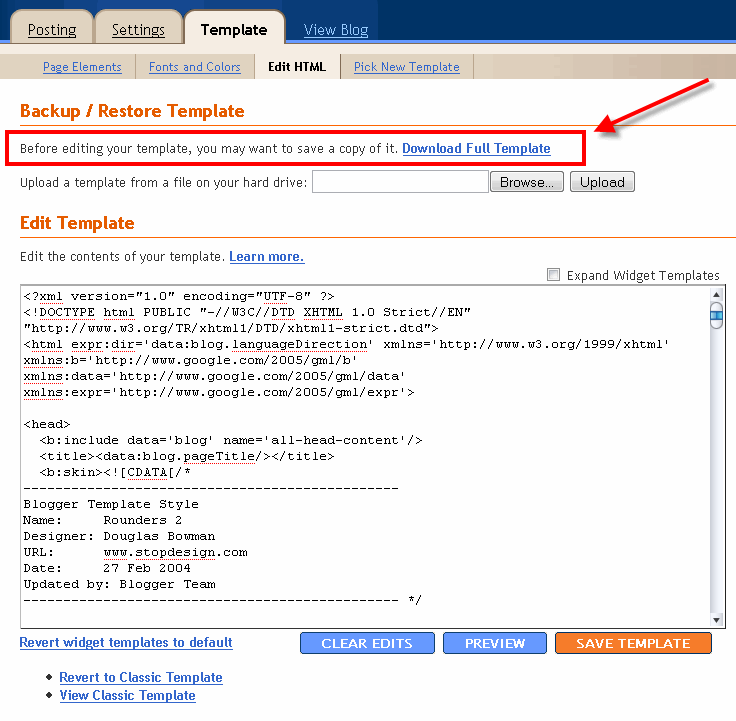
Step #1 – Backup Your Current Template

Backup Blogger TemplateBackup your current Template just in case you make a mistake. This is very important so you can always go back (click on the screenshot to the left to see exactly how this is done). You’ll want to navigate to the “Template” => “Edit HTML” section of Blogger and then look for the “Before editing your template, you may want to save a copy of it. Download Full Template“. Click on the “Download Full Template” and save it somewhere easy to find later on your computer. We are not responsible for any mistakes you make in applying your new Blogger template. Once you have saved this .xml file onto your computer, move on to step #2.

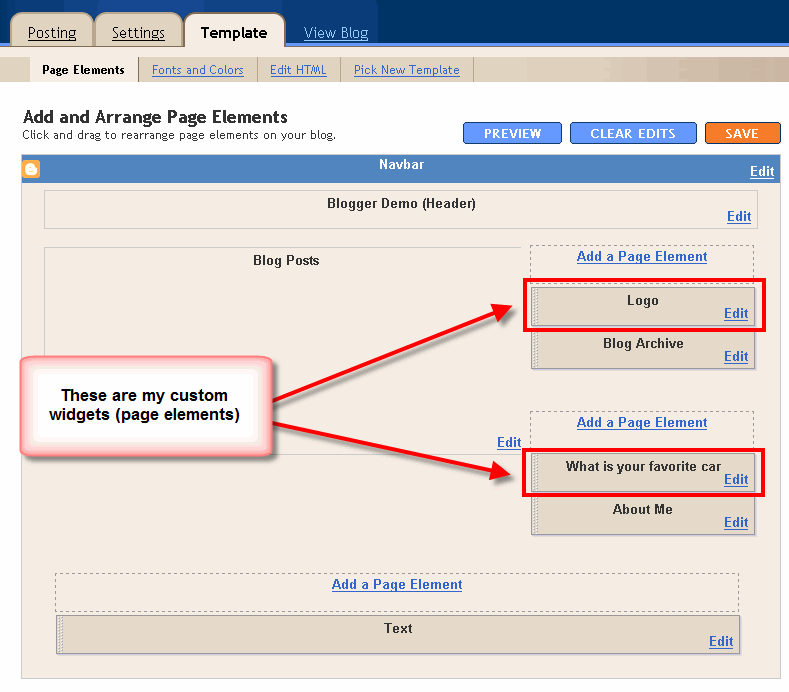
Step #2 – Take a Screenshot of Your Page Elements

Blogger Page Elements ScreenshotThis next step isn’t necessary but I like to do it anyhow. Take a screenshot of your “Page Elements” page just so you know exactly what widgets (Page Elements) you had before applying the new template (an example of the exact page you should take a screenshot of is in the image to the left). If you blow away all your widgets and you don’t remember which ones you had, this screenshot will at least help you remember. If you’re unsure as to how to take a screenshot, then check out this quick tutorial (MS Windows).

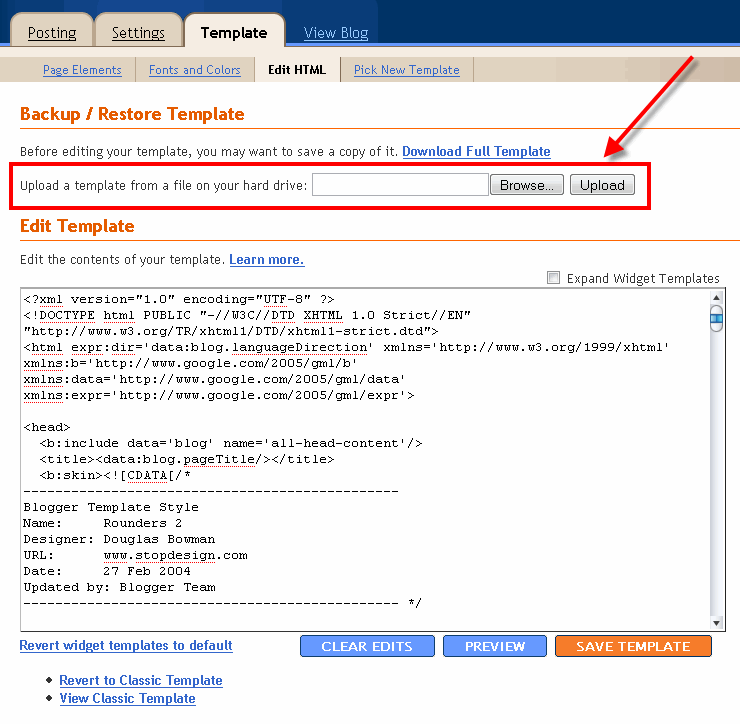
Step #3 – Upload Your New Blogger Template

Upload new blogger templateNow it’s time to upload the new Blogger template from your computer. You’ll want to navigate to the “Template” => “Edit HTML” section of Blogger and then look for the “Upload a template from a file on your hard drive:” text. To the right of that you’ll see two buttons. First, you’ll click on “Browse” and navigate to the new .xml Blogger template on your computer and click “Open”. Then you click on the “Upload” button and cross your fingers.
At this point Blogger is attempting to apply the new .xml Blogger template to your blog. After it’s done, you’ll get a message stating that the upload and new template was applied successfully (in that case you’re done!) or more likely in my case, you’ll get a red error message that states something like:

Widgets are about to be deleted

Please confirm that the following widgets should be deleted. All the widgets’ configuration data will be lost.
  • Text1
  • BloggerButton1
  • Poll1
  • Profile1
Now if you’re like me, you don’t want to lose all those widgets (Page Elements) you spent lots of time configuring and arranging on your blog. If you don’t care and really don’t have anything you’ll be upset losing, then go ahead and click on the “Confirm and Save” button that looks like this:
confirm-save-button.gif
Just remember, that you’ll need to re-add any page elements that you had previously setup in your old template. If they were simple or just recently added then I’d recommend just re-adding them instead of having to follow the next steps. If you decide you want to keep your widgets (Page Elements) then write down (or take another screenshot) the list mentioned above that are going to be deleted. You’ll use this list later when we migrate over your widgets.

Step #4 – Transfer Widgets to New Blogger Template

This process is going to take some careful cut and pasting within the template code so if you’re not comfortable doing this, then I’d recommend just ending on the previous step. First things first, click on the blue cancel button (you should still be on the previous step) that looks like this:
cancel blogger button
This will cancel out of the new Blogger template you were just trying to upload. Next, we’re going to essentially make a temporary placeholder for your widgets (Page Elements) within your current template. You should still be in the “Template” => “Edit HTML” section of Blogger so if you’re not, go back to that section.
You’re going to actually edit this template code now so pay close attention. Look for the following piece of code which is all the way at the bottom.
</body></html>
Now you’re going to replace that code with the following bit of code:
<b:section id='widgets-placeholder' showaddelement='yes'/></body></html>
Save your template and you’ll see this message (which is a good sign):
blogger changes saved
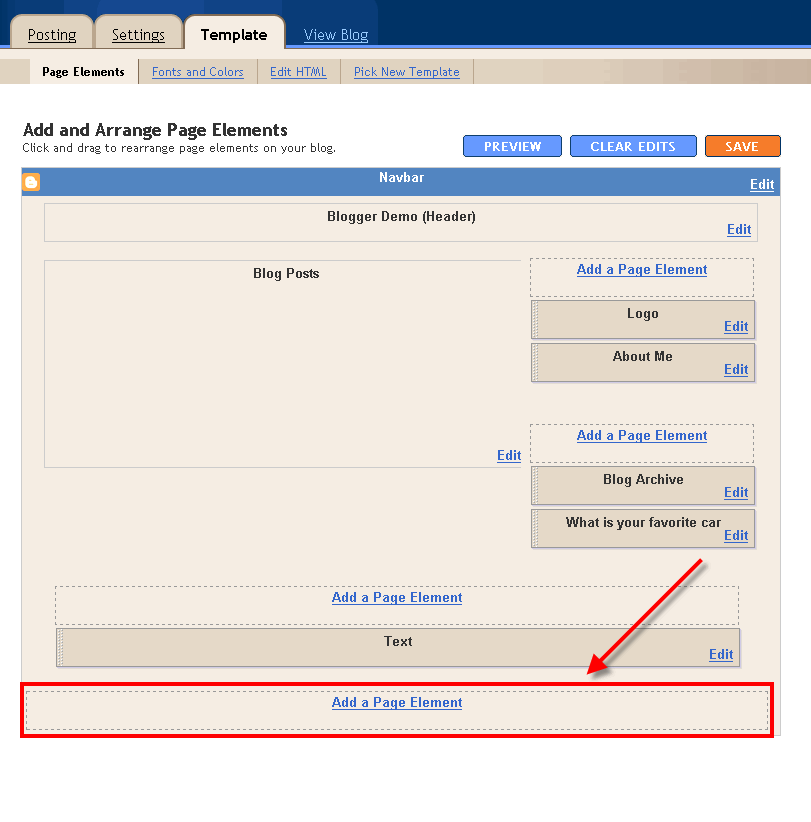
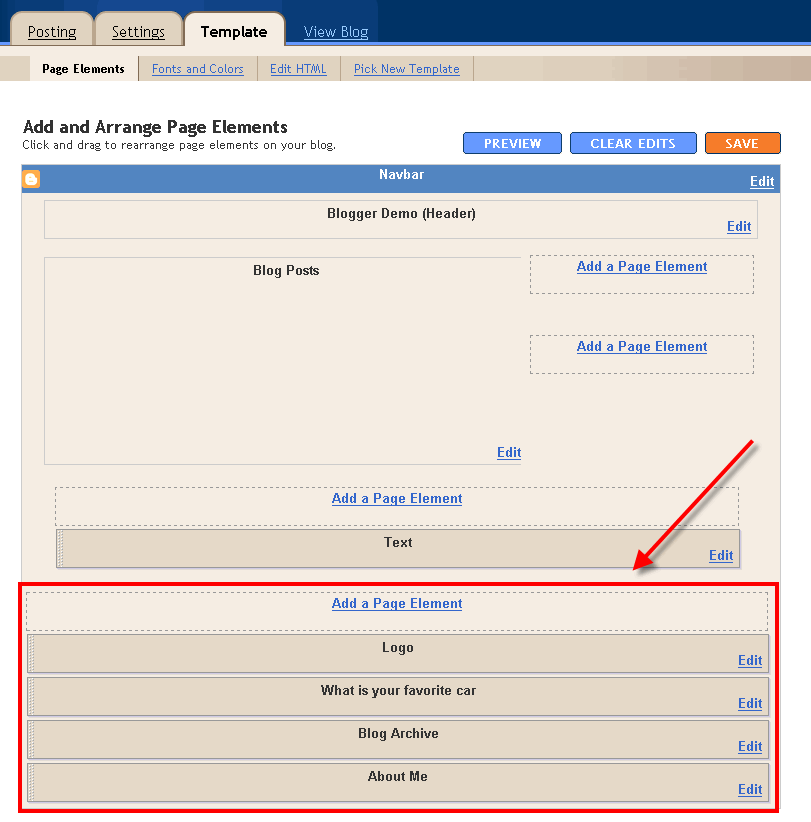
blogger-new-page-element-footer.gifWhat did we just do? We created a brand new widget (Page Element) in your current Blogger template so we can move all your widgets over to keep them safe! Next navigate over to the “Template” => “Page Elements” section of Blogger and you’ll see a blank new footer section.
Drag all your widgets (Page Elements) that were going to be deleted (we wrote them down or took a screenshot in step #3). The order doesn’t really matter as long as you’ve moved them all down into the widget (top image on left). After you’re done, it should look something like this (bottom image on left):
blogger moved widgetsNow click on the “Save” button and the temporary placeholder for our widgets will be saved. We’re not done quite yet but if you’ve gotten this far already you’ve done great! The hardest part is over. Now we’re going to copy the widgets we just protected over to your new template. Hold off on that bathroom break and let’s keep going.
Next, go back to the “Template” => “Edit HTML” section of Blogger and scroll down in the template code and look for the line of code you added before:
<b:section id='widgets-placeholder' showaddelement='yes'/></body></html>
There should now be a bunch more code in between it which will look something like this:
<b:section id='backupwidget' showaddelement='yes'><b:widget id='BloggerButton1' locked='false' title='' type='BloggerButton'/>

<b:widget id='Poll1' locked='false' title='What is your favorite car' type='Poll'/>

<b:widget id='BlogArchive1' locked='false' title='Blog Archive' type='BlogArchive'/>

<b:widget id='Profile1' locked='false' title='About Me' type='Profile'/>

</b:section></body></html>
This is a list of all your widgets (Page Elements) that we just moved into the footer. You want to select all this code and copy it. We’re going to paste it into our new Blogger template code which will complete the transfer safely.
Now open your new Blogger template xml file in a text editor (you can use Notepad, just right click -> Open With -> Choose Notepad). Once you have it open, scroll all the way down to the bottom of the code and look for the following code:
</body></html>
You’re going to replace this code with the new code you just copied above. Make sure you only replace that one bit of code otherwise you might run into some problems. Save your new Blogger template and you’ve finished transferring your widgets (Page Elements) into the new Blogger template!
Now after all that work just to save your precious widgets, let’s hope the new template works ok in Blogger. Go back to step #3 above and upload your new template like you attempted to do before. If all goes well, your new template will properly save and your blog will be updated!

Step #5 – Move Your Widgets Back To Their Original Spots

I’m assuming your new template installed without and problems and you’re ready to move your widgets (Page Elements) back to their original spots. This is just the reverse process of what we did before by going to the “Template” => “Page Elements” section of Blogger and moving them out of the footer and back into the sidebar (or wherever you originally had them in your old template).
After you arrange them to your liking, make sure to save and view your blog. If all went well then your blog should be looking the way it did before the new template was applied (well, except for the new beautiful design which is the main reason for this hassle in the first place right?). :-)

Summary

Congratulations on adding a new custom Blogger xml template to your blog! The whole process should have taken anywhere from 15 minutes to 1 hour depending on your experience and comfort with blog template code, the code quality of the new template, and the number of widgets your blog currently has. Blog designs shouldn’t have to change very often so hopefully this is a one-time process for you. If not, I recommend you bookmark or add this page to your favorites so it’s easy to find the next time you decide to change Blogger templates.

Still Having Problems?

Problems or errors during this procedure? Unfortunately, the Blogger xml templates are very picky and don’t always work with your blog. This can be because of several reasons so it’s not always easy to resolve. Sometimes the best way is to just delete one widget at a time and see if that resolves the issue. Blogger doesn’t give you very good error messages to act on so sometimes it’s a shot in the dark.
If you’ve got a specific case you’d like to ask about, please post a comment below. I will respond and help if possible. Your specific problem might help others address their issue as well.
Ready to super charge your blog? Check out our professional premium blogger templates or make money by joining our blog affiliate program!
If you like this post then please consider subscribing to our eBlog Templates RSS feed. You can also subscribe by email and have new templates and articles sent directly to your inbox.